
Document authenticity
A verification code and hash connect a document to its Dead Point record. Anyone can check it without signing in or joining the workspace.
Code and hash in the PDF
Section titled “Code and hash in the PDF”Published-version PDFs and receipt PDFs include a verification code, QR code and SHA-256. A code such as XXXX-XXXX-XXXX finds the version; SHA-256 is a fingerprint of the content. Changing the file changes its SHA-256. The QR code opens the verification page.
Check by code, hash or file
Section titled “Check by code, hash or file”- Open
/verifyon the API domain using the document link or QR code. - Enter the verification code or 64-character hash, or select the original PDF, up to 10 MB.
- Select Verify. When both a code and file are supplied, the file takes priority.
A code returns Version found. It locates a record but does not prove that your file is unchanged: a code can be copied onto an altered document. Compare the fingerprint or upload the PDF. Authentic confirms that the submitted hash or file matches the registry.
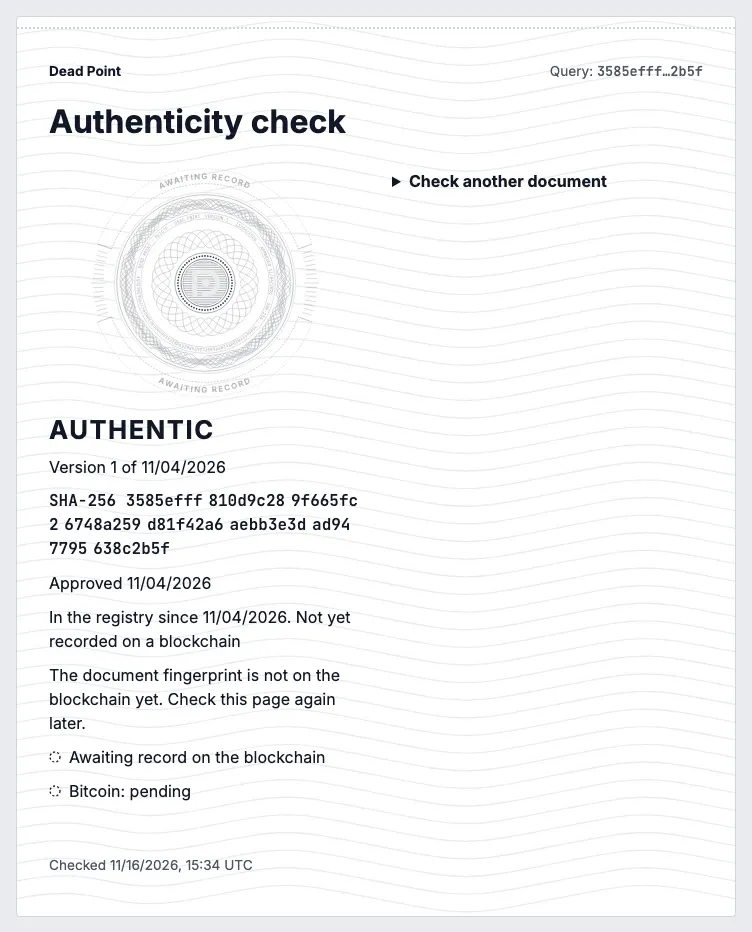
The result shows the version number, publication date, approval information and anchoring status. Public verification does not reveal the estimate title, amounts, names or email addresses. The permanent receipt page is different: its link grants access to approval details, so keep it private.
Not found does not automatically mean forgery: check the code characters and try the original PDF. For Invalid input, enter a code or a 64-character hash. If the file is larger than 10 MB, choose an original file within the limit; do not resave it to compress it. If The check failed, please try again later appears, retry later.
Approval receipt
Section titled “Approval receipt”After approval, the client receives an email with a permanent receipt link and a PDF attachment. The author downloads it from the approval section of the link editor. The receipt page shows the version, publication and approval dates, chosen option, confirmation by email code, approved snapshot hash and report settings hash. Verify authenticity opens /verify.
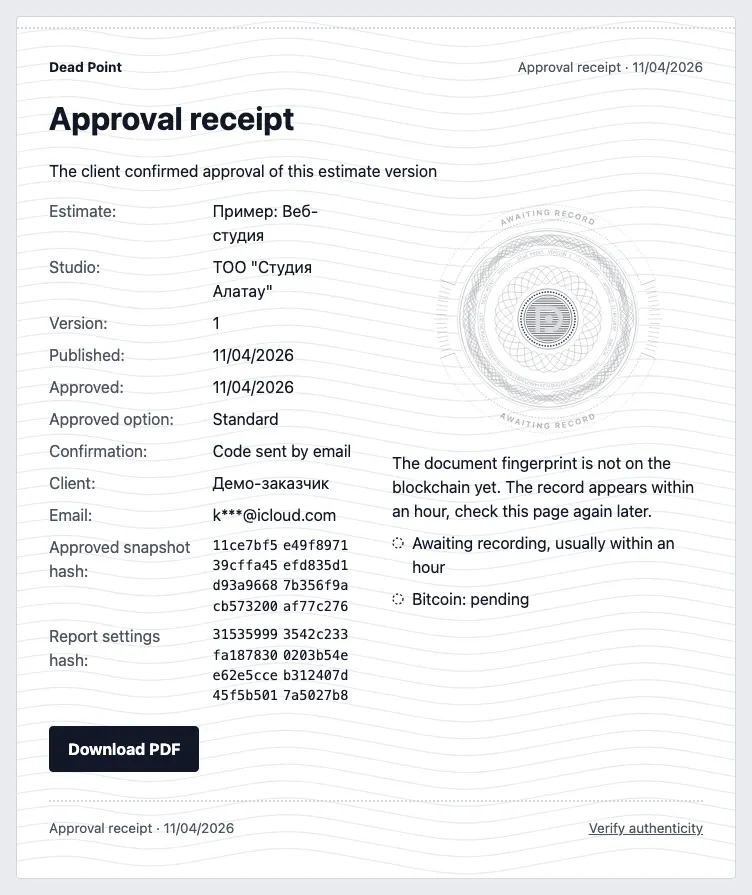
The receipt remains available after link revocation and estimate deletion. After deleting the estimate, use the permanent link from the email. It is retained for 5 years after approval. See Client approval.
Blockchain fingerprint
Section titled “Blockchain fingerprint”The Dead Point registry and a blockchain record are separate evidence. Authentic means a registry match, not a record in Solana or Bitcoin. Until recording actually happens, the status is pending. A registry date or approval date is not a network confirmation date.
Only actual Solana anchoring supplies a transaction and slot; Bitcoin confirmation is separate and includes a block number. A recorded fingerprint lets you check that a document with that content existed no later than that record. No anchoring date is promised before confirmation, and no waiting time is guaranteed. How to verify the record yourself is described below.
What goes on the blockchain
Section titled “What goes on the blockchain”Only hashes go to the network. The estimate name, amounts, names and emails never reach the blockchain.
- 5-minute window. Every 5 minutes, the SHA-256 hashes of all version and receipt PDFs issued within that UTC window are built into a Merkle tree, if the window contains documents. Its root is recorded in Solana by a transaction of the Dead Point program
HHZtFaka3noPqU2GhujD75yp1Yi7mF6tRrv8NFZ82YDDand is also sent to OpenTimestamps calendars, which record it in Bitcoin. Empty windows are not recorded. There are 288 windows per day. - Day. After the UTC day ends, the window roots of that day are built into a super-root. It is stored in the month account in Solana and cannot change once written.
The tree works like this: a leaf is the document SHA-256 as is, leaves are sorted, a node is the SHA-256 of the concatenated 32 bytes of its left and right children, and an unpaired node moves up a level unchanged.
Statuses
Section titled “Statuses”| On the page | Meaning |
|---|---|
| Awaiting record on the blockchain | The fingerprint is not recorded yet, or the record is not final (finalized) yet |
| Anchored in Solana, slot N | The window root is recorded in Solana and the transaction is finalized. A Solscan link to the transaction is next to it |
| Bitcoin: pending | OpenTimestamps calendars accepted the root, the Bitcoin block is not known yet |
| Bitcoin: confirmed, block N | The window root is in Bitcoin block N. The .ots file can be checked with ots verify |
The PDF and the verification page show the same data as SOLANA · SLOT N and BITCOIN · BLOCK N stamps.
Independent verification
Section titled “Independent verification”You do not need Dead Point to verify: the PDF and public Solana and Bitcoin data are enough. The proof JSON becomes available after the UTC day in which the document was issued ends.
-
Compute the SHA-256 of your PDF:
shasum -a 256 document.pdf(macOS) orsha256sum document.pdf(Linux). -
Download the proof JSON from the link in the verification block or from
/verify/proof/<SHA-256>on the API domain. It containsbatch(the UTC window keyYYYYMMDDHHmm),batch_pathandbatch_root(window path and root),batch_tx(window transaction signature and slot),day_pathandsuper_root(day path and super-root),day.pda(month account address) andbitcoin. -
Walk the path from the document SHA-256 to the window root and from the window root to the super-root. At each step a sibling marked
leftgoes on the left,righton the right:merkle_check.py import hashlib, json, sysproof = json.load(open(sys.argv[1]))def climb(node: bytes, path) -> bytes:for step in path:sibling = bytes.fromhex(step["hash"])pair = sibling + node if step["side"] == "left" else node + siblingnode = hashlib.sha256(pair).digest()return nodebatch_root = climb(bytes.fromhex(proof["sha256"]), proof["batch_path"])assert batch_root.hex() == proof["batch_root"], "batch root"super_root = climb(batch_root, proof["day_path"])assert super_root.hex() == proof["super_root"], "super root"print("ok", proof["batch_root"], proof["super_root"])Run:
python3 merkle_check.py proof.json. -
Open the window transaction in Solscan at
https://solscan.io/tx/<batch_tx.signature>. Check that it calls the programHHZtFaka3noPqU2GhujD75yp1Yi7mF6tRrv8NFZ82YDDand that theanchor_batchinstruction data and theBatchAnchoredevent contain the samebatch_root. -
Read the month account
day.pdathrough any public Solana RPC and compare the day super-root. The first day offset is1128 = 8 + 4 + 1116: 8 discriminator bytes, 4 month bytes and a 1116-byte bitmap for 31 × 288 windows. The record of dayDstarts at offset1128 + (D − 1) × 52: 32 bytes of super-root, then the day window count (4 bytes, little-endian):Terminal window PDA=... # day.pdaDAY=20 # day of monthcurl -s https://api.mainnet-beta.solana.com -H 'Content-Type: application/json' \-d "{\"jsonrpc\":\"2.0\",\"id\":1,\"method\":\"getAccountInfo\",\"params\":[\"$PDA\",{\"encoding\":\"base64\",\"commitment\":\"finalized\"}]}" \| python3 -c 'import base64,json,sys; d=base64.b64decode(json.load(sys.stdin)["result"]["value"]["data"][0]); o=1128+(int(sys.argv[1])-1)*52; print(d[o:o+32].hex(), int.from_bytes(d[o+32:o+36],"little"))' "$DAY"Set
PDAtoday.pdaandDAYto the day of the month. The first value must matchsuper_root. -
Download the
.otsfile with Download .ots or from/verify/ots/<SHA-256>and put it next to the PDF.ots verify document.pdf.otsfrom the OpenTimestamps client checks the path from the file SHA-256 to the Bitcoin block. It needs access to a Bitcoin node, see the OpenTimestamps documentation.
If the roots and the transaction match, a document with this content existed no later than the Solana slot and the Bitcoin block. If any step does not match, the file differs from the one whose fingerprint was recorded.
Limitations
Section titled “Limitations”- Versions published before authenticity verification was released cannot be checked. Old files do not acquire confirmation retroactively.
- The PDF has no electronic signature from the service. A registry match does not identify the file's author.
- A receipt does not replace the client's qualified electronic signature. Recording a fingerprint alone does not establish a contract's legal validity.