

Working-days calendar
The working-day calendar sets which days count as working days when the estimate timeline is calculated. Holidays, short days and moved days are taken into account automatically, so the end date matches the work schedule of the selected country.
What the calendar covers
Section titled “What the calendar covers”- Holidays: official non-working days are not counted in the timeline
- Short days: days before a holiday (the Short days section in the banner)
- Working weekends: moved days, when a Saturday or Sunday becomes a working day (the Working Saturdays and Sundays section)
Only China has working weekends: its official calendar uses moved days (tiaoxiu). Other countries do not have them.
Two hour fields
Section titled “Two hour fields”The estimate Settings tab has two hour fields, and they are independent:
- Team capacity, h/day (pricing group) sets how long tasks take: the hours of work the team completes per day
- Working day, h (Calendar and workload group) is the calendar working day. It sets the weekly load and does not change task duration
For example, with an 8 h working day and a capacity of 6 h/day, a 12-hour task takes two working days.
Supported countries
Section titled “Supported countries”The calendar is available for 7 countries and regions, with the Eurozone selected by default. The source for each one is shown in the estimate banner (Source: ...).
| Country | Calendar source |
|---|---|
| Eurozone | TARGET2, ECB payment system closing days |
| USA | US federal holidays |
| Georgia | Holidays set by the Government of Georgia |
| Kazakhstan | Kazakh production calendar |
| China | Chinese production calendar (State Council) |
| Belarus | Belarusian production calendar |
| Russia | Russian production calendar |
The calendar comes from the workspace country. Where to choose it, how it is detected on first sign-in and how to change it is covered in Workspace country.
Day reason in the date picker
Section titled “Day reason in the date picker”In the start date calendar, holidays and moved days off are highlighted, and a hint names the reason:
- On a computer: hover over the day, or press Tab to enter the calendar and move to the day with the arrow keys.
- On a phone: tap the day. The calendar closes and a line appears under the field, for example "November 26: Thanksgiving Day".
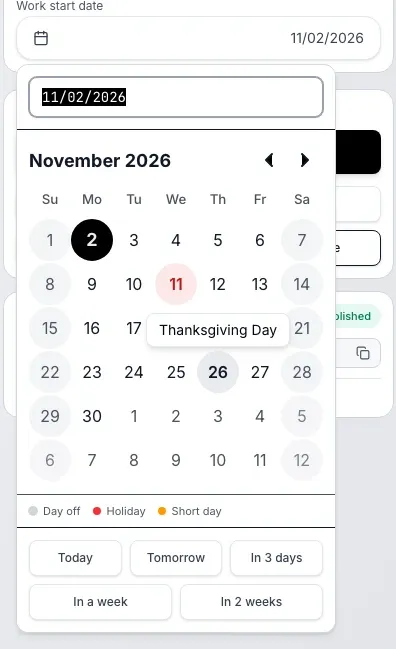
The name comes from the calendar of the workspace country and is shown in the interface language. Examples for the English interface:
| Workspace country | Day | Hint |
|---|---|---|
| USA | July 3, 2026 | Independence Day (observed) |
| Georgia | May 9 | Day of Victory over Fascism |
| Kazakhstan | December 16, 2026 | Independence Day |
The Russian interface shows the Russian name from the country calendar, Georgian and Chinese show the English one. If the calendar has no English name, a generic label in the interface language appears: "Holiday" or "Day off transferred".
Plain Saturdays and Sundays, short days and China's working weekends have no hint.
If the calendar for a year is not published yet
Section titled “If the calendar for a year is not published yet”Official calendars are published in advance, but not for every year ahead. If there is no data for the year you need, the calculation uses the most recent available calendar and notes this in the banner.
If the calendar service is temporarily unavailable, the calculation runs without holidays, and the banner says so too.