

Delete your account
You delete the account in your profile: in the iPhone and Android app or in the browser. You need access to the account email, because the confirmation code is sent there. A deleted account cannot be restored.
How to delete the account
Section titled “How to delete the account”- Open the user menu and choose "Profile".
- On the "Profile" tab scroll down and press "Delete account".
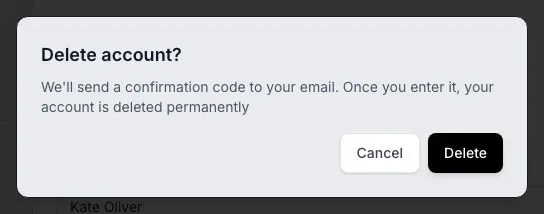
- In the "Delete account?" dialog press "Delete". A code is sent to your email.
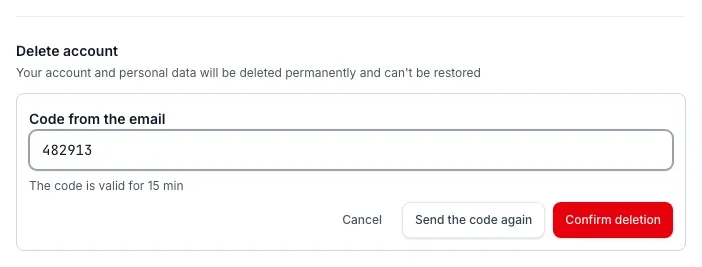
- Enter the code from the email in the "Code from the email" field. The line under the field says how long the code is valid: 15 minutes.
- Press "Confirm deletion".
After the confirmation the app or the browser returns you to the sign-in screen.
What is removed and when
Section titled “What is removed and when”| When | What happens |
|---|---|
| At once | The account is anonymized: personal data is removed from the profile. All sessions end and nobody can sign in to the account. |
| After 30 days | The anonymized account and the personal data tied to it are physically erased from the database. |
| Kept by law | The audit log and payment documents. These records are not linked to you and contain no personal data. |
Errors
Section titled “Errors”| What you see | What to do |
|---|---|
| "The code is wrong or expired" | Check the code. It is valid for 15 minutes: press "Send the code again" and enter the new one. |
| "First remove the members or transfer ownership of the workspace" | You own a workspace that has members. Remove the members or transfer ownership, then try again. |
| "Couldn't delete the account, please try again" | Try again in a minute. If it does not help, write to support. |
No access to the account email, or the deletion fails: write to support@deadpoint.app.
See also
Section titled “See also” Account deletion on the website The same instructions without signing in, for the app stores
MCP: connect an agent Agent tokens are revoked separately from the account