

Your first estimate in 5 minutes
This tutorial walks through one end-to-end example: you create a project, build an estimate from line items, calculate the timeline and price, then publish a version and send the link to your client.
Before you start
Section titled “Before you start”Sign in at app.deadpoint.app: the sign-in link arrives by email. After you sign in, the workspace dashboard opens: your projects, estimates and a hint on where to start.
Dashboard
Section titled “Dashboard”The first screen after sign-in is called Work overview. It shows the projects and estimates of the current workspace and leads to the next step.
- At the top are the All projects and New estimate buttons. Until you have a project, New estimate is unavailable, with the hint "Create a project first"
- Get started: a checklist of three steps, Create a project, Add line items to an estimate and Publish the estimate. A step is ticked by itself once the workspace has a project, an estimate with line items, and a published or approved estimate. The button sits on the first unfinished step, the counter reads "1 of 3 done"
- Continue where you left off: up to six latest estimates and projects without estimates, newest first. A row shows the name, the project or description, the date, the status and the estimate amount. Clicking a row opens the estimate or the project, and the Show all activity button leads to the project list
- Quick actions: the block appears once the workspace has projects or estimates. It holds Open projects, most often together with New estimate
An empty workspace shows only the buttons at the top and the checklist with the Create project button.
You can remove the checklist with the cross button Dismiss checklist. When all steps are done, it hides by itself. The choice is remembered in the browser for each workspace separately.
Step 1. Create a project
Section titled “Step 1. Create a project”An estimate always lives inside a project, so start there.
- Open the project list and click New Project
- Enter the Project Name and, if you like, a description
- Click Launch Project
Step 2. Create an estimate
Section titled “Step 2. Create an estimate”- In the project, click Create Estimate
- Choose how to start: Blank estimate or Start with an example for your niche (see Estimate templates)
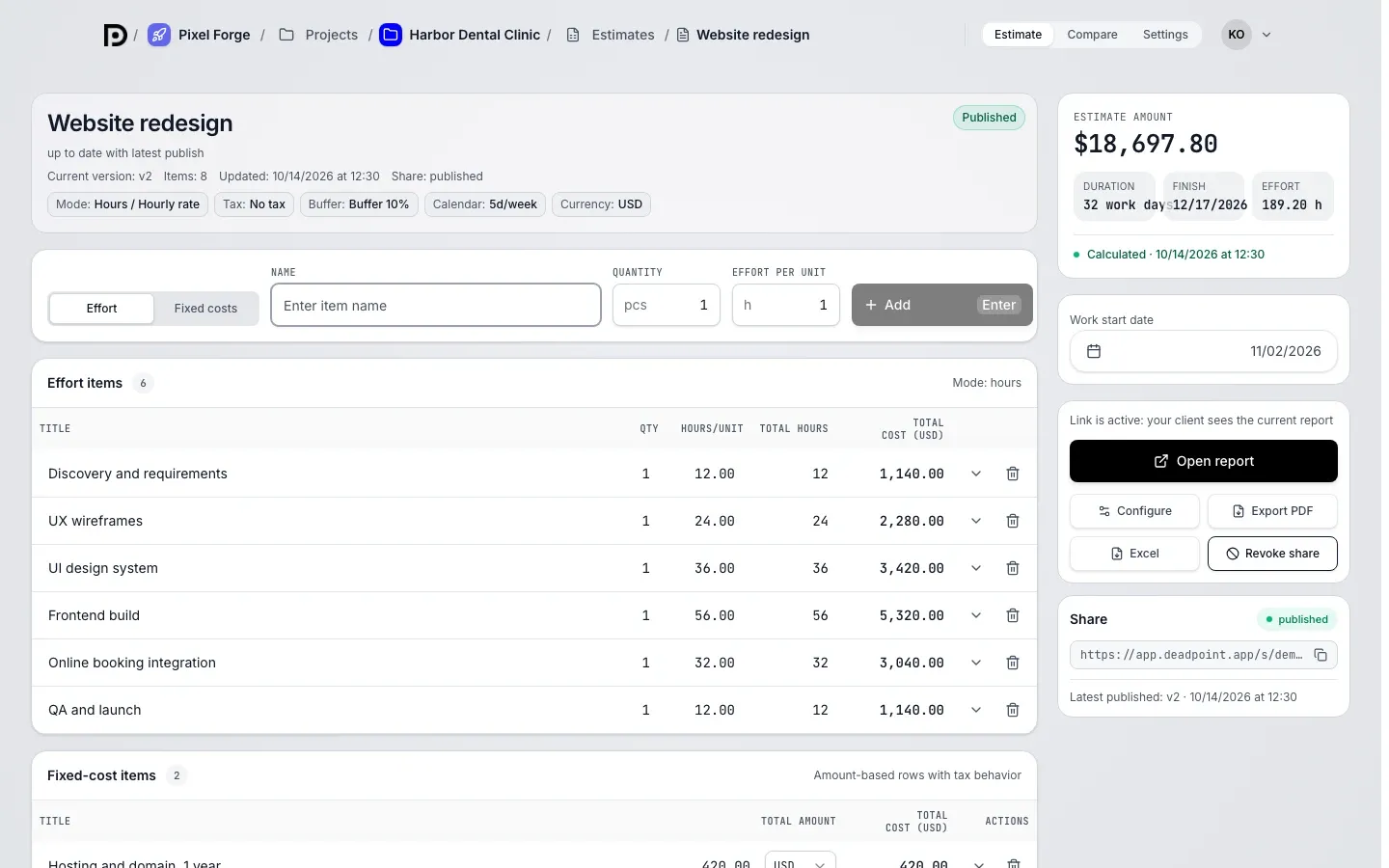
- The estimate editor opens with three tabs: Estimate, Compare and Settings. Version history is on the Compare tab
- Give the estimate a name in the header
Step 3. Choose the estimation unit
Section titled “Step 3. Choose the estimation unit”An estimate is counted in hours or in points. Set the unit on the Settings tab, in the Calculation mode section.
Changes on the Settings tab do not apply right away: until you save them, a bar at the bottom shows Save changes and Discard. Discard brings back the saved values. If saving fails, the bar shows "Not saved" with the reason, and the values you entered stay in the fields so you can try again.
Default team cost
Section titled “Default team cost”A new estimate starts with a monthly team cost in the workspace currency. It is roughly the same amount everywhere, about 8,000 EUR a month:
| Currency | Team cost per month |
|---|---|
| EUR | 8,000 |
| USD | 9,000 |
| GEL | 23,000 |
| KZT | 4,000,000 |
| CNY | 60,000 |
| BYN | 27,000 |
| RUB | 120,000 |
Adjust it for your team in the estimate settings, or set your own default in workspace settings, the Estimation tab. Saved estimates do not change.
Step 4. Add line items
Section titled “Step 4. Add line items”An estimate has two kinds of line items. You add both in the Quick add block.
- Pick the item type with the toggle: Effort (work in hours or points) or Fixed costs (a fixed price: licenses, hardware, subcontractors)
- Fill in the Name and the estimate, then click Add
On a phone the block is collapsed into an Add item button: it opens a short form with the same fields.
Rows are edited right in the table and have no separate save: a value is saved with Enter, Tab or when you pick it from a list.
A fixed cost can be in another currency: for example, a state fee in lari in an estimate in dollars. The total is converted at the official rate (see Currencies and rates).
Step 5. Check the calculation
Section titled “Step 5. Check the calculation”The calculation runs by itself after every saved change to a row or to the settings. Dead Point combines effort and fixed costs, applies tax and the working-day calendar, and shows effort, duration in working days, end date and total cost in the total card.
- Calculated: the total matches the latest data
- Recalculate: the button appears when the total is out of date
- Retry: the button appears when the total could not be updated; the last calculation stays on screen
Step 6. Publish and send to your client
Section titled “Step 6. Publish and send to your client”- Click Publish version: the calculation is saved as a numbered estimate version
- Click Configure client link. The editor opens: settings on the left, a preview of the client page on the right
- Go through the Before sending checklist: timeline, payment details, approver, item names
- Click Create link, copy the link and send it to your client
Done: your client opens the estimate by link with no sign-up, sees the Dead Point date and the timeline calendar, and can approve and pay. This is what a finished demo link looks like.
Quick add and keyboard shortcuts
Section titled “Quick add and keyboard shortcuts”Line items are added in the Quick add block, cells of the estimate table can be edited from the keyboard, and two shortcuts work on any screen.
| Where | Keys | What happens |
|---|---|---|
| Any screen, cursor not in an input field | N, then W | Workspace creation opens |
| Any screen, cursor not in an input field | N, then P | Project creation opens in the first workspace of the list |
| Quick add | Enter | The line item is added, the form returns to defaults |
| Quick add | Ctrl or Cmd + Enter | The line item is added, the values stay, the name is selected |
| Estimate table, cell selected | Enter | Editing of the cell starts |
| Estimate table, cell being edited | Enter | The value is saved, the cell stays selected |
| Estimate table, cell being edited | Esc | Editing is cancelled |
| Estimate table, cell being edited | Tab or Shift + Tab | The value is saved, the next or previous cell is selected |
| Estimate table, cell selected | Arrow keys | The neighboring cell is selected |