

Currencies and rates
An estimate has one currency, but the items inside it can use different ones. Fixed costs keep their own currency, the effort rate has a rate currency, and Dead Point converts everything to the estimate currency at an official or your own rate. Rates are frozen when you publish a version, so the figures in the report do not drift after you send it to your client.
Supported currencies
Section titled “Supported currencies”Estimates support seven currencies. The default rate source comes from the workspace country. You can change it in workspace settings, the FX rate source field.
| Currency | Code | Symbol | Official source |
|---|---|---|---|
| Euro | EUR | € | ECB (Eurozone) |
| US dollar | USD | $ | FRED (US) |
| Georgian lari | GEL | ₾ | NBG (Georgia) |
| Kazakhstani tenge | KZT | ₸ | NBK (Kazakhstan) |
| Chinese yuan | CNY | ¥ | PBoC (China, aggregated) |
| Belarusian ruble | BYN | Br | NBRB (Belarus) |
| Russian ruble | RUB | ₽ | National banks of KZ, BY, GE |
The national banks of Kazakhstan, Belarus and Georgia publish the Russian ruble rate. If there is no fresh rate, set your own rate in the estimate: see the "Custom rate" section.
A new estimate uses the workspace Default currency. You can change it in workspace settings, the General tab. It applies to new estimates only.
Currency per item
Section titled “Currency per item”Each item can have its own currency when it differs from the estimate currency:
- Fixed costs. Every row has its own currency picker. A new item starts in the estimate currency
- Effort. All effort items are priced from one rate, so they share one currency: the Rate currency. The hourly rate and team cost are set in it. The effort section shows a badge such as Rate in USD
Totals, tax and the timeline are calculated in the estimate currency. Each item in another currency is converted and rounded on its own, the rate is multiplied by the exchange rate without intermediate rounding, and tax is added after conversion.
Example: a law firm in Tbilisi
Section titled “Example: a law firm in Tbilisi”A firm estimates a company registration for a client from Germany. The estimate is in USD, lawyers bill 120 USD per hour, and the state fee, notary and translation are paid in lari.
| Item | Type | Amount | In the estimate currency |
|---|---|---|---|
| Charter and founding documents | Effort | 8 h × 120 USD | 960.00 USD |
| State registration fee | Fixed cost | 200.00 GEL | 76.96 USD |
| Notary certification | Fixed cost | 150.00 GEL | 57.72 USD |
Conversion at the NBG rate on 14.10.2026: 1 GEL = 0.3848 USD. You can open a finished estimate like this on the demo link.
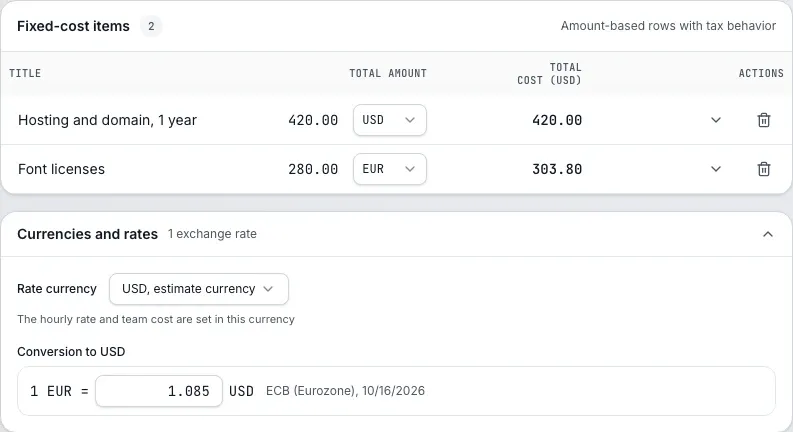
The screenshot shows another example: a US studio estimates in USD and pays for font licenses in EUR. The ECB rate: 1 EUR = 1.085 USD.
The "Currencies and rates" block
Section titled “The "Currencies and rates" block”Below the item tables there is a Currencies and rates block. When everything is in one currency, it collapses to one line, All amounts in EUR. Once an item or the rate uses another currency, the block shows:
- Rate currency: the currency of the hourly rate and team cost
- Conversion to USD: currency pairs with the rate, source and date, for example "1 GEL = 0.3848 USD, NBG (Georgia), 14.10.2026"
- a Custom rate field for each pair and a Use official rate button
Read a rate like this: one unit of the item currency equals that many units of the estimate currency.
Custom rate
Section titled “Custom rate”Use a custom rate when the rate is fixed in a contract or there is no official rate.
- Expand the Currencies and rates block below the estimate tables
- In the row of the pair, enter the rate in the Custom rate field
- The change saves right away and the estimate recalculates
- To go back to the official rate, click Use official rate
A custom rate wins over the official one. In the report, such a pair is marked as a rate set by the contractor instead of showing a source.
No rate or an outdated rate
Section titled “No rate or an outdated rate”- No official rate. The block opens by itself and asks for a custom rate: No exchange rate for GEL to USD. Enter a custom rate below to finish the calculation
- Outdated rate. Dead Point uses the rate from the workspace source if it is no older than 7 days. If it is older, it takes a fresh rate from another official source. If no source has a fresh rate, it takes the most recent one it finds, and the pair is marked Outdated rate with the source and date. You can still publish such an estimate, but a custom rate gives an exact conversion
What your client sees
Section titled “What your client sees”In the client report, PDF and Excel, an item in another currency shows two amounts: in the estimate currency and the original below it, for example "$76.96" and "200.00 ₾". A footnote under the cost lists the rates: pair, rate, source and date.
The rates used for the version are stored in it at publishing. A published version does not change, even if the rate changes later.
The report has a language and currency menu, so the client can view totals in the currency they prefer. Amounts in the estimate currency are converted, original item amounts stay as they are. If the rate for that conversion has not been updated for a while, the Rate older than 5 days warning appears next to it.
Workspace rates
Section titled “Workspace rates”Besides the custom rate inside an estimate, there are workspace rates: Custom exchange rates in settings. They are used for conversion in the report and do not take part in choosing the rate for estimate items.
- Open Custom exchange rates in settings
- Click Add a custom rate
- Pick currencies in the From and To fields and set the Rate: one unit of the From currency equals this many units of the To currency. If needed, add a Label (for example, "Contract with ClientX")
- If needed, limit the period with Effective from and Effective until
- Click Add rate
Rules for rates:
- The From and To currencies must differ, and the rate must be greater than zero. Otherwise the Add rate button is unavailable, and with equal currencies Source and target must differ appears under the form
- Empty Effective from and Effective until mean no date limit. A rate applies while today's date falls into the period, both ends included
- If several rates apply to a pair at once, the one added last is used
- A row of the list shows the currency pair, the rate as "1 USD = 90 EUR", and the label and period if they are set. A rate is deleted with the trash button at the end of its row
- If you cannot change workspace settings, the list of rates is visible, but the fields and buttons are unavailable